Within Access Methods
When One Bad Setup Spread Everywhere
Reusing one insecure Windows installation image could reproduce the same weak administrator settings across many government computers.
On this page
- Mc Kinnon's claims about repeated machine configurations
- How system imaging can copy insecure settings
- Why standardized deployment needs security checks
Page outline Jump by section
Introduction
One of the recurring themes in Gary McKinnon’s account of accessing poorly protected United States government computers was that he believed many Windows systems appeared to have been deployed from the same underlying setup. If that observation was correct, it helps explain why the same weak administrator configuration could be encountered repeatedly across different machines. Rather than each computer being misconfigured independently, an insecure “golden image” or master installation could have copied the same settings to dozens or even hundreds of systems. Although the precise scale of this practice in the networks McKinnon accessed has never been publicly verified, the underlying technical mechanism is well established and remains an important lesson in secure system deployment.[Microsoft Learn]learn.microsoft.comMicrosoft LearnMaintain Driver Configurations when Capturing a Windows Image | Microsoft LearnJanuary 18, 2021…
When one bad setup spread everywhere
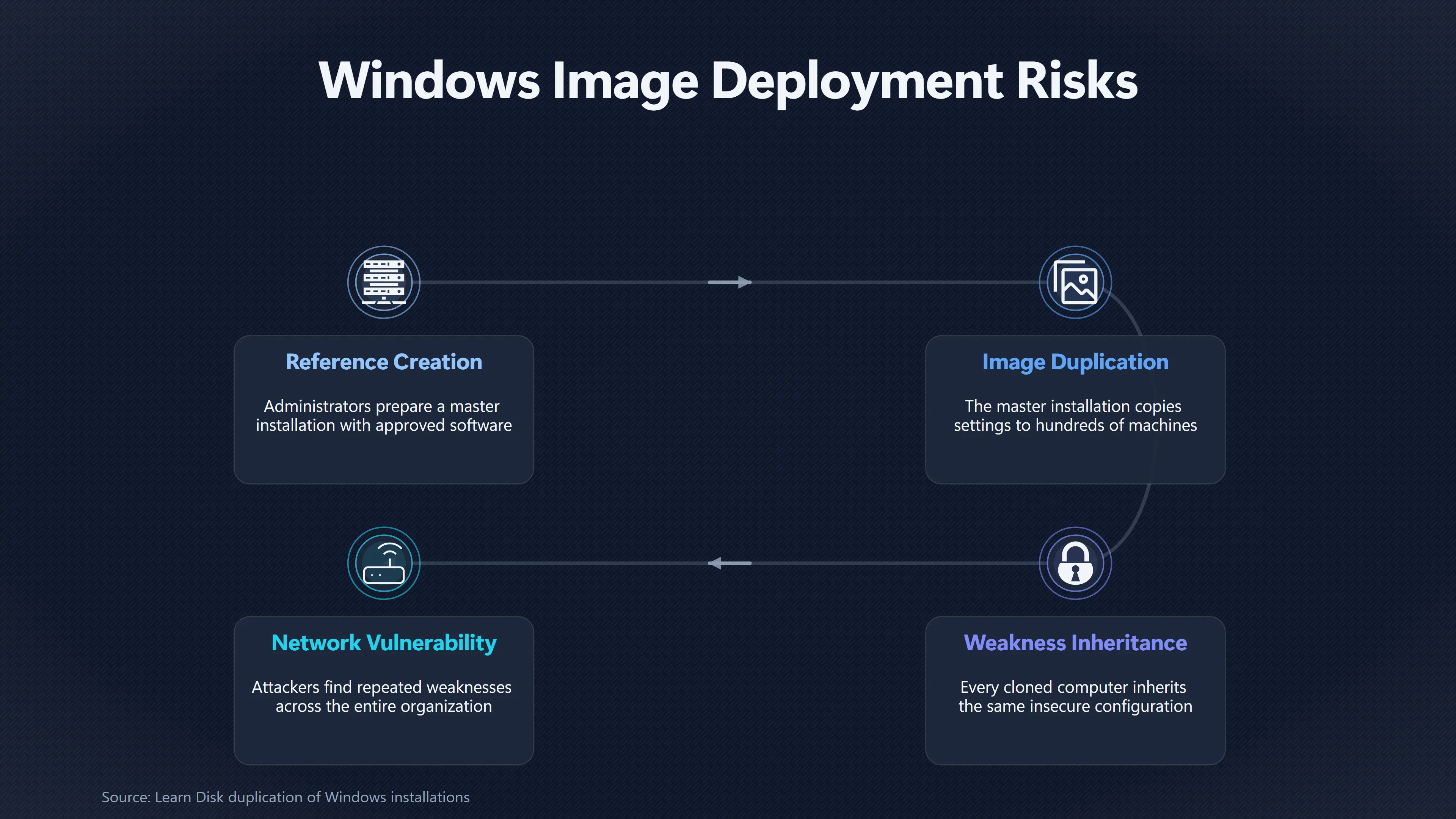
Government organisations have long relied on standard Windows installation images to deploy large numbers of computers quickly. Instead of configuring every workstation individually, administrators prepare one reference installation containing the operating system, approved software and organisational settings, then duplicate that image across many machines.
This approach greatly reduces deployment time and improves consistency. However, consistency cuts both ways. If the reference image contains an insecure administrator account, unnecessary services, weak local policies or other configuration mistakes, every computer built from that image inherits the same problems. Microsoft’s deployment guidance has consistently stressed that images should be prepared carefully and generalised before deployment because cloned installations otherwise reproduce system-specific or insecure settings.[Microsoft Learn]learn.microsoft.comLearn Sysprep (Generalize) a Windows installation | Microsoft LearnMicrosoft LearnSysprep (Generalize) a Windows installation | Microsoft LearnDecember 15, 2021…
For McKinnon, whose methods reportedly relied on finding repeated weaknesses rather than exploiting sophisticated software flaws, this kind of standardisation would have been advantageous. Once he recognised a familiar configuration, similar machines elsewhere in the same organisation could present comparable opportunities.
McKinnon’s claims about repeated machine configurations
McKinnon has repeatedly stated in interviews that he encountered groups of Windows computers configured in remarkably similar ways, including systems that appeared to share weak administrator settings. His broader public comments are not equivalent to evidence tested in court, and prosecutors did not base their case on proving identical cloned images across government networks. Nevertheless, his descriptions are technically plausible because large organisations commonly deployed standard Windows builds during the early 2000s.[Reddit]reddit.comHi, i'm Gary Mckinnon. I was in the news for a decade after getting caught 'hacking' mil/gov systems looking for evidence of UFO/UA…
The available legal record focuses on the alleged unauthorised access itself rather than explaining every administrative practice behind the affected systems. It describes the use of administrative credentials on internet-accessible Windows machines but does not attempt to establish that all vulnerable computers originated from one deployment image. Consequently, claims about extensive image reuse should be treated as informed observations rather than established judicial findings.
The significance lies less in proving the exact number of cloned systems than in recognising how enterprise deployment practices could amplify a single configuration mistake across an entire organisation.
How system imaging can copy insecure settings
A Windows reference image can preserve far more than installed applications. Depending on how it is prepared, it may also duplicate:
- Local administrator account settings.
- Password policies.
- Enabled remote management services.
- Firewall rules.
- Registry configuration.
- Installed remote administration software.
- Security templates and local permissions.
If administrators fail to remove machine-specific information or review security settings before deployment, every computer starts life with identical security assumptions. Microsoft’s imaging guidance requires administrators to use the System Preparation Tool (Sysprep) to generalise Windows installations before capturing deployment images, specifically to remove machine-specific information and prepare systems for safe duplication.[Microsoft Learn]learn.microsoft.comLearn Sysprep (Generalize) a Windows installation | Microsoft LearnMicrosoft LearnSysprep (Generalize) a Windows installation | Microsoft LearnDecember 15, 2021…
Modern Microsoft documentation also warns that unattended installations allowing blank administrator passwords create a security risk, illustrating how insecure deployment choices can become embedded in an installation image if not corrected before rollout.[Microsoft Learn]learn.microsoft.comLearn Administrator Password | Microsoft LearnMicrosoft LearnAdministratorPassword | Microsoft LearnJanuary 18, 2019…
Why repeated administrator settings become dangerous
The real danger is not simply that computers look alike. The problem arises when identical privileged credentials or policies exist across multiple machines.
Microsoft’s security guidance explains that if local administrator accounts use the same username and password throughout an environment, compromising one machine can make it significantly easier to move to others using those same credentials. Rather than treating every computer as an independent target, an attacker benefits from predictable administration across the network.[Microsoft Learn]learn.microsoft.comLearn Avenues to Compromise | Microsoft LearnMicrosoft LearnAvenues to Compromise | Microsoft LearnMay 12, 2025…
This creates a multiplier effect:
- One vulnerable deployment image creates many vulnerable computers.
- One successful compromise can reveal credentials useful elsewhere.
- Administrators may mistakenly assume each system represents an independent failure when all inherit the same root cause.
- Correcting the problem becomes more difficult because every deployed machine requires remediation or rebuilding.
In McKinnon’s case, this helps explain why repeated weak administrative configurations could matter more than any single vulnerable computer.
Standardised deployment still needs security checks
The lesson from this aspect of the McKinnon case is not that standardised deployment is inherently insecure. In fact, carefully managed imaging remains one of the safest ways to maintain large fleets of computers because it allows organisations to enforce consistent security baselines.
The critical difference lies in validating the reference image before deployment. Modern enterprise practice includes security review of master images, unique local administrator credentials, automated compliance testing and periodic rebuilding of deployment templates as security standards evolve. Microsoft’s deployment documentation continues to emphasise proper image preparation with Sysprep and warns against unsupported cloning methods that duplicate machine identity information.[Microsoft Learn]learn.microsoft.comLearn Disk duplication of Windows installationsMicrosoft LearnDisk duplication of Windows installations - Windows Server | Microsoft Learn…
The broader lesson extending from the networks McKinnon encountered is straightforward: standardisation magnifies whatever it contains. A secure master image can improve the security of thousands of computers, but an insecure one can reproduce the same weakness just as efficiently.
Amazon book picks
Further Reading
Books and field guides related to When One Bad Setup Spread Everywhere. Use these as the next step if you want deeper reading beyond the article.
The Practice of System and Network Administration
With 28 new chapters, the third edition of The Practice of System and Network Administration innovates yet again! Revised with thousands...
Windows Internals
The definitive guide–fully updated for Windows 10 and Windows Server 2016 Delve inside Windows architecture and internals, and see how co...
Site Reliability Engineering
The overwhelming majority of a software systemâ??s lifespan is spent in use, not in design or implementation. So, why does conventional w...
Infrastructure as Code
Six years ago, Infrastructure as Code was a new concept. Today, as even banks and other conservative organizations plan moves to the clou...
eBay marketplace picks
Marketplace Samples
Live-tested eBay searches with available results related to this page.
Selected fromhacker t shirt oneBay.co.uk.

Endnotes
1.
Source: learn.microsoft.com
Link:https://learn.microsoft.com/en-us/windows-hardware/manufacture/desktop/maintain-driver-configurations-when-capturing-a-windows-image?view=windows-11
Source snippet
Microsoft LearnMaintain Driver Configurations when Capturing a Windows Image | Microsoft LearnJanuary 18, 2021...
Published: January 18, 2021
2.
Source: learn.microsoft.com
Title: Learn Disk duplication of Windows installations
Link:https://learn.microsoft.com/en-us/troubleshoot/windows-server/backup-and-storage/windows-installations-disk-duplication?source=recommendations
Source snippet
Microsoft LearnDisk duplication of Windows installations - Windows Server | Microsoft Learn...
3.
Source: learn.microsoft.com
Title: Learn Sysprep (Generalize) a Windows installation | Microsoft Learn
Link:https://learn.microsoft.com/en-gb/windows-hardware/manufacture/desktop/sysprep–generalize–a-windows-installation?view=windows-10
Source snippet
Microsoft LearnSysprep (Generalize) a Windows installation | Microsoft LearnDecember 15, 2021...
Published: December 15, 2021
4.
Source: reddit.com
Link:https://www.reddit.com/r/UFOs/comments/t0imdw
Source snippet
Hi, i'm Gary Mckinnon. I was in the news for a decade after getting caught 'hacking' mil/gov systems looking for evidence of UFO/UA...
5.
Source: learn.microsoft.com
Title: Learn Administrator Password | Microsoft Learn
Link:https://learn.microsoft.com/en-us/windows-hardware/customize/desktop/unattend/microsoft-windows-shell-setup-useraccounts-administratorpassword
Source snippet
Microsoft LearnAdministratorPassword | Microsoft LearnJanuary 18, 2019...
Published: January 18, 2019
6.
Source: learn.microsoft.com
Title: Learn Avenues to Compromise | Microsoft Learn
Link:https://learn.microsoft.com/en-us/windows-server/identity/ad-ds/plan/security-best-practices/avenues-to-compromise
Source snippet
Microsoft LearnAvenues to Compromise | Microsoft LearnMay 12, 2025...
Published: May 12, 2025
7.
Source: techcommunity.microsoft.com
Title: Separating standard and privileged accoun
Link:https://techcommunity.microsoft.com/blog/itopstalkblog/some-tools-and-techniques-for-hardening-windows-server/4539840
Source snippet
tools and techniques for hardening Windows Server | Microsoft Community HubJuly 22, 2026 — ENFORCE LEAST PRIVILEGE AND SEPARATE ADMINISTR...
Published: July 22, 2026
8.
Source: techcommunity.microsoft.com
Title: hardening administrative actions what it pros need to know
Link:https://techcommunity.microsoft.com/blog/windows-itpro-blog/hardening-administrative-actions-what-it-pros-need-to-know/4503956
Source snippet
administrative actions: What IT pros need to know - Windows IT Pro BlogApril 9, 2026 — Windows IT Pro Blog 7 MIN READ HARDENING ADMINISTR...
Published: April 9, 2026
9.
Source: techcommunity.microsoft.com
Link:https://techcommunity.microsoft.com/blog/windows-itpro-blog/hardening-administrative-actions-what-it-pros-need-to-know/4503956/replies/4511359
10.
Source: learn.microsoft.com
Title: windows installations disk duplication
Link:https://learn.microsoft.com/sk-sk/troubleshoot/windows-server/setup-upgrade-and-drivers/windows-installations-disk-duplication
11.
Source: support.microsoft.com
Link:https://support.microsoft.com/en-us/topic/strengthening-administrator-protection-and-kerberos-authentication-f67abf78-41c5-4a89-a2da-a7b2fe280270
12.
Source: learn.microsoft.com
Title: legacy privileged access devices
Link:https://learn.microsoft.com/en-us/security/privileged-access-workstations/legacy-privileged-access-devices
13.
Source: learn.microsoft.com
Title: deployment image servicing and management dism best practices
Link:https://learn.microsoft.com/en-in/windows-hardware/manufacture/desktop/deployment-image-servicing-and-management–dism–best-practices?view=windows-11
14.
Source: techcommunity.microsoft.com
Title: security baseline final for windows 10 v1903 and windows server v1903
Link:https://techcommunity.microsoft.com/blog/microsoft-security-baselines/security-baseline-final-for-windows-10-v1903-and-windows-server-v1903/701084
15.
Source: schneier.com
Title: Gary Mc Kinnon
Link:https://www.schneier.com/?p=2390
16.
Source: theguardian.com
Title: Gary Mc Kinnon | Life and style | The Guardian
Link:https://www.theguardian.com/theobserver/2007/apr/22/features.magazine7
Additional References
17.
Source: its.wsu.edu
Title: sysprep required for windows imaging
Link:https://its.wsu.edu/2026/04/29/sysprep-required-for-windows-imaging/
Source snippet
Required for Windows Imaging | Information Technology Services | Washington State UniversityApril 29, 2026 — SYSPREP REQUIRED FOR WINDOWS...
Published: April 29, 2026
18.
Source: theguardian.com
Link:https://www.theguardian.com/theguardian/2012/oct/19/interview-janis-sharp-gary-mckinnon
19.
Source: projectcamelot.org
Link:https://projectcamelot.org/lang/en/gary_mckinnon_interview_transcript_en.html
20.
Source: theguardian.com
Link:https://www.theguardian.com/world/2008/jul/27/internationalcrime.hacking
21.
Source: computerweekly.com
Link:https://www.computerweekly.com/news/2240086153/Gary-McKinnon-broke-into-73000-US-government-computers-Lords-told
22.
Source: the-independent.com
Link:https://www.the-independent.com/news/science/gary-mckinnon-inside-the-head-of-a-super-hacker-6095677.html
23.
Source: theguardian.com
Title: ‘World’s biggest hacker’ fights extradition to US | Technology | The Guardian
Link:https://www.theguardian.com/technology/2005/jul/28/usnews.uknews
24.
Source: csri.info
Title: CSR I | “Gary Mc Kinnon was unlucky. He’s not even a very good hacker”
Link:https://www.csri.info/gary-mckinnon-was-unlucky-hes-not-even-a-very-good-hacker/
25.
Source: theguardian.com
Title: Hacker ‘left note on US army computer’ | Hacking | The Guardian
Link:https://www.theguardian.com/technology/2005/jul/27/hacking.internetcrime
26.
Source: futureintelligence.co.uk
Title: “Gary Mc Kinnon was unlucky. He’s not even a very good hacker”
Link:https://www.futureintelligence.co.uk/2012/10/18/gary-mckinnon-was-unlucky-hes-not-even-a-good-hacker/